


The Private Mode live room is now live!
Whether you're hosting exclusive sessions for high-value users or managing premium content, Private Mode enables more precise audience targeting and a higher-quality interaction experience. Learn more
What is a Private Mode live room?
Private Mode is a newly launched restricted-access live streaming format on Gate Live.
Unlike fully public or traditional subscription-based rooms, Private Mode uses three access control mechanisms—exclusive links, room passcodes (invite codes), and UID-based targeted invitations—to create a gated environment and precisely reach specific viewers.
This feature is ideal for small-group sharing, premium content, core fan engagement, and high-value user management. It helps streamers filter viewers more effectively, control content distribution, and deliver a more focused, high-quality interactive experience.
[Streamer Guide] How to enable a Private Mode live room & invite viewers
How to schedule a Private Mode live stream?
1.Before you begin:
- Please use the Web version to apply and go live
2.Setup steps:
- Room Mode: On the live stream setup page, select "Private Mode" . The system will automatically generate a passcode for access control.
- Invited Viewers (Optional): Enter specific viewer UIDs. Invited viewers can enter directly without a passcode.
- Display on Listing Page (Optional): When enabled, your live room will appear on the Gate Live homepage, balancing privacy with exposure.
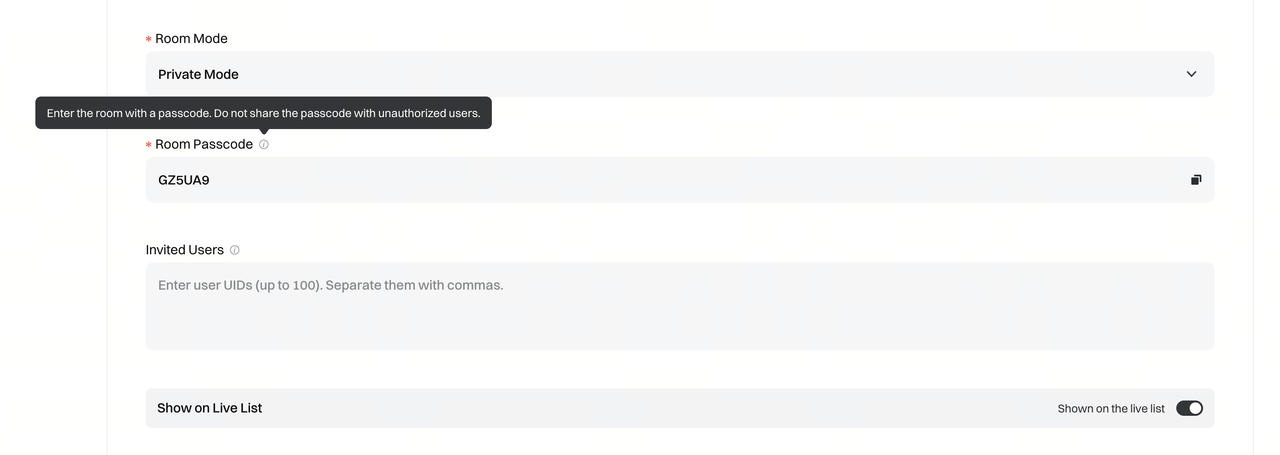
3.Go live:
- After completing the setup, start streaming via the Web version
How to invite your target viewers? (App must be updated to v8.18.0 or above)
1.Share via link (Recommended)
Send the live room link to your target viewers. They can enter directly by clicking the link without manually entering an invite code.
2.Set invited viewers
During setup, you can add specific viewer UIDs as invited viewers. These viewers can enter directly without a passcode.
3.Listing page display (Recommended)
If "Display on Listing Page" is enabled, your live room will appear on the Gate Live homepage with a privacy label. Viewers who enter from the homepage will need to input the passcode to access the stream. Please share the passcode with your target viewers in advance.
Video Tutorial Guide
Disclaimer
The content provided herein is for reference and educational purposes only and does not constitute any financial, investment, trading, or legal advice, nor does it constitute an offer or solicitation to buy or sell any digital assets. Gate makes no express or implied representations or warranties regarding the accuracy, completeness, or timeliness of the information contained herein. Product features, interfaces, rules, and fee structures may be updated or adjusted at any time. Please refer to the latest announcements and the actual information displayed on the Gate platform for the most accurate details.
Digital asset investments involve significant risk, and prices may fluctuate substantially. You may lose the entire amount of your investment. Please make decisions cautiously based on your own financial situation and risk tolerance after fully understanding the associated risks. If necessary, you are advised to consult an independent professional financial or legal advisor.
For more information about potential risks, please refer to Gate's Risk Disclosure and User Agreement.
